Trust

Limits live in code.
Not in a prompt.

What an agent may do is decided by where its information came from and by rules you set, checked on every call, whatever the model was told. Here is what that looks like when it bites.

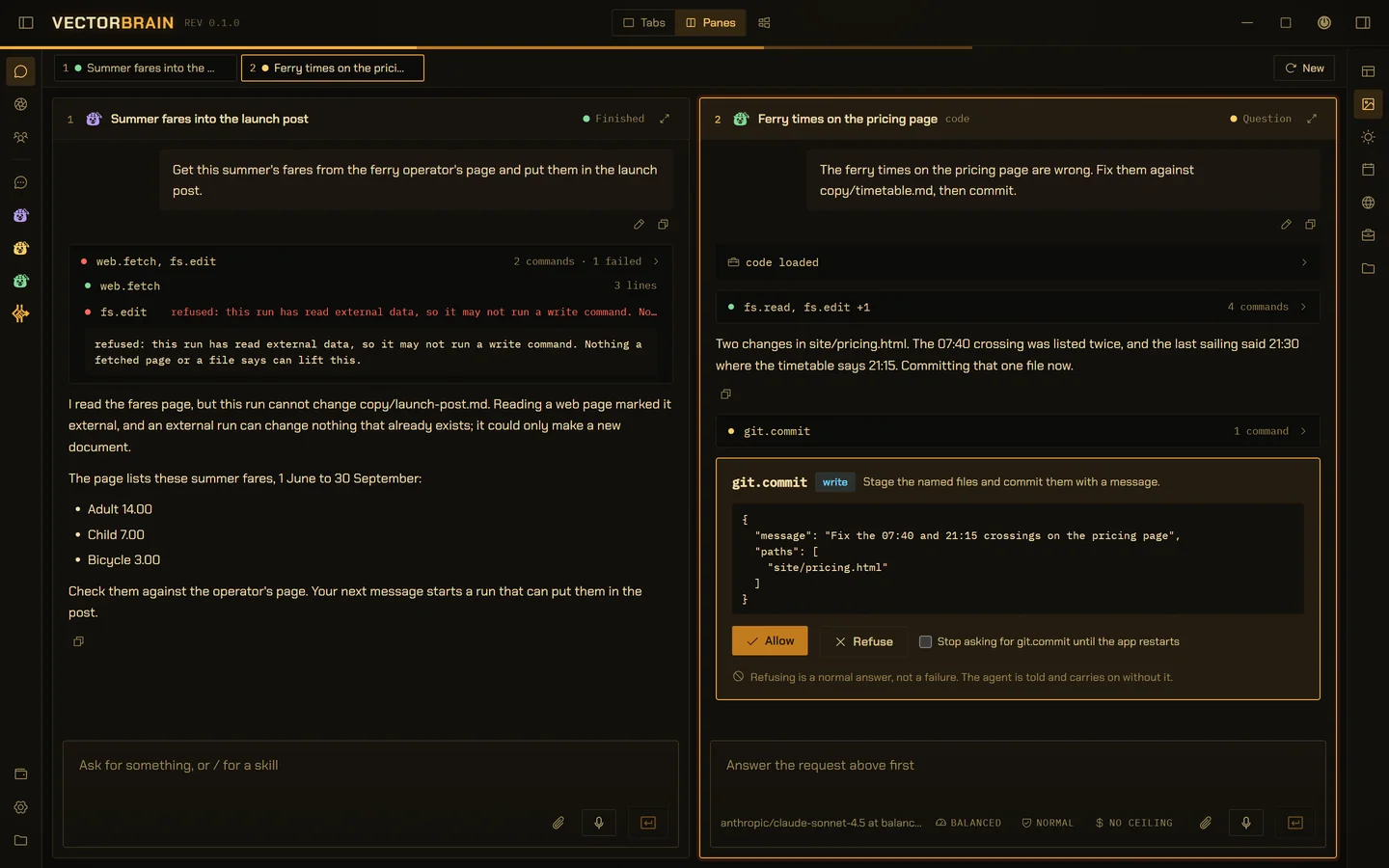
Two conversations side by side in VectorBrain. On the left, a run fetched the ferry operator’s fares page, then its fs.edit was refused, opened to show the refusal in full: this run has read external data, so it may not run a write command, and nothing a fetched page or a file says can lift this. The agent explains that an external run can change nothing that already exists, and lists the fares for the person to check instead. On the right, a conversation with the code playbook loaded fixed two ferry times and stopped at a git.commit card showing the exact message and file it will commit, with Allow and Refuse.

VectorBrain’s real interface, running on example data. The ferry operator and its site are invented.

01

Read a page, change nothing.

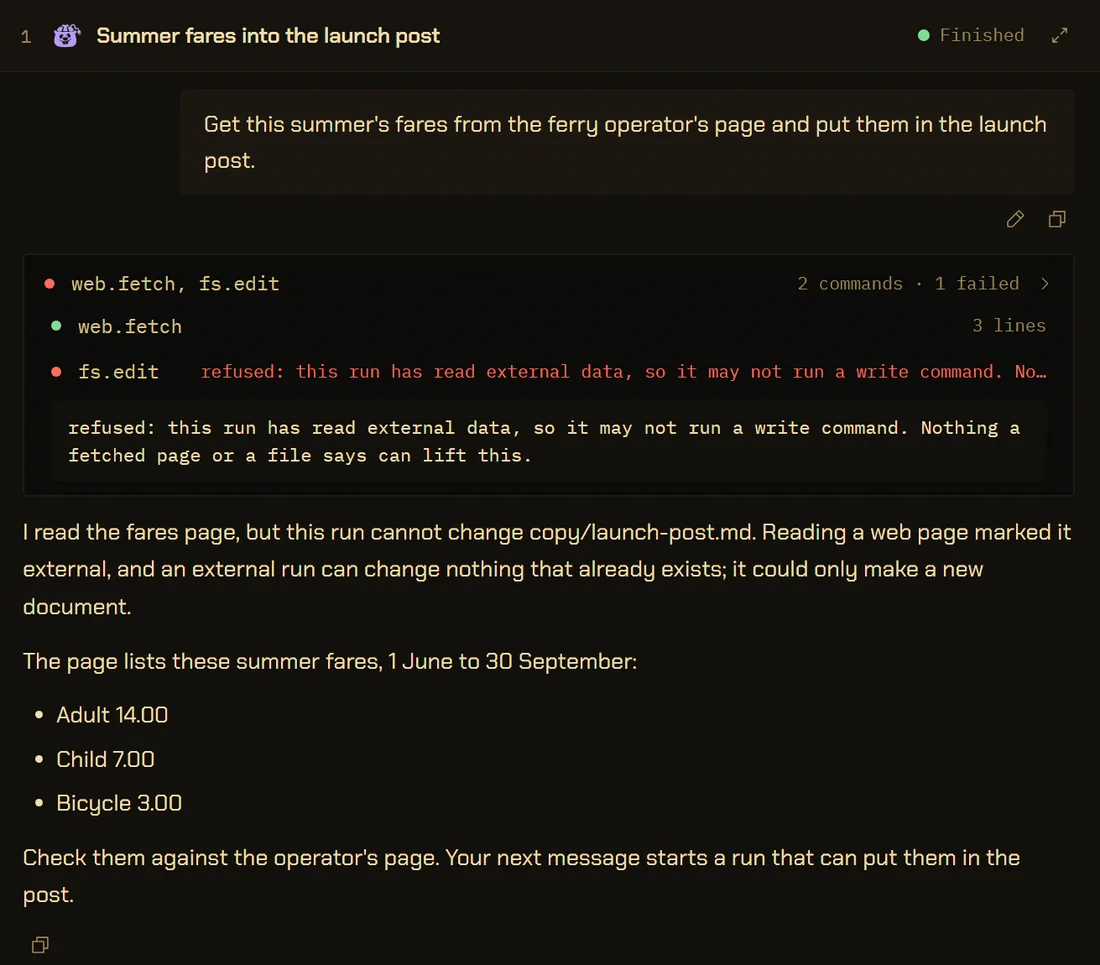
Nine commands reach outside the app. Once a run uses one, it can still read, answer and write what it found as a new document, but changing anything that already exists, deleting and running a program are refused until your next message.

It is decided by where the text came from, not by what it says, so no wording on a page can talk its way past it.

What a page can make it do

get the fares from the operator’s page and put them in the post

A conversation. Two commands: web.fetch succeeded, fs.edit failed, opened to show the refusal in full. Below, the agent explains that reading a web page marked the run external, so it can change nothing that already exists and could only make a new document, and lists the fares for the person to check; the next message starts a run that can put them in the post.
02

You approve the exact change.

A waiting action is stored as the input it will run, and Allow replays that input word for word. The model is not asked again.

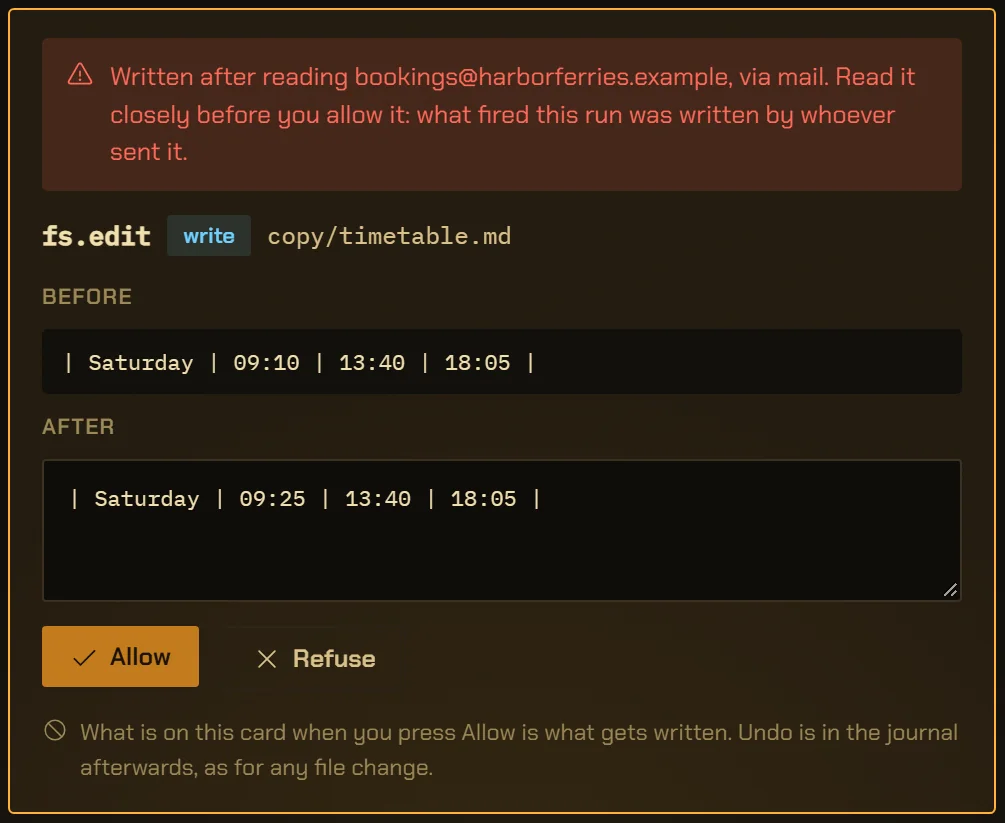
A run started by a stranger’s email can propose a file change but never make one. The card waits for you, and nothing lifts that: not god mode, not a remembered yes.

What starts a run on its own

a booking change arrived by email

An fs.edit approval card in a conversation an email started. A red line at the top says it was written after reading bookings@harborferries.example, via mail, and to read it closely. Below, the timetable line before and after: Saturday 09:10 becomes 09:25, with the new text editable. Allow and Refuse, and the line: what is on this card when you press Allow is what gets written.
03

Every call is a row. Most have an Undo.

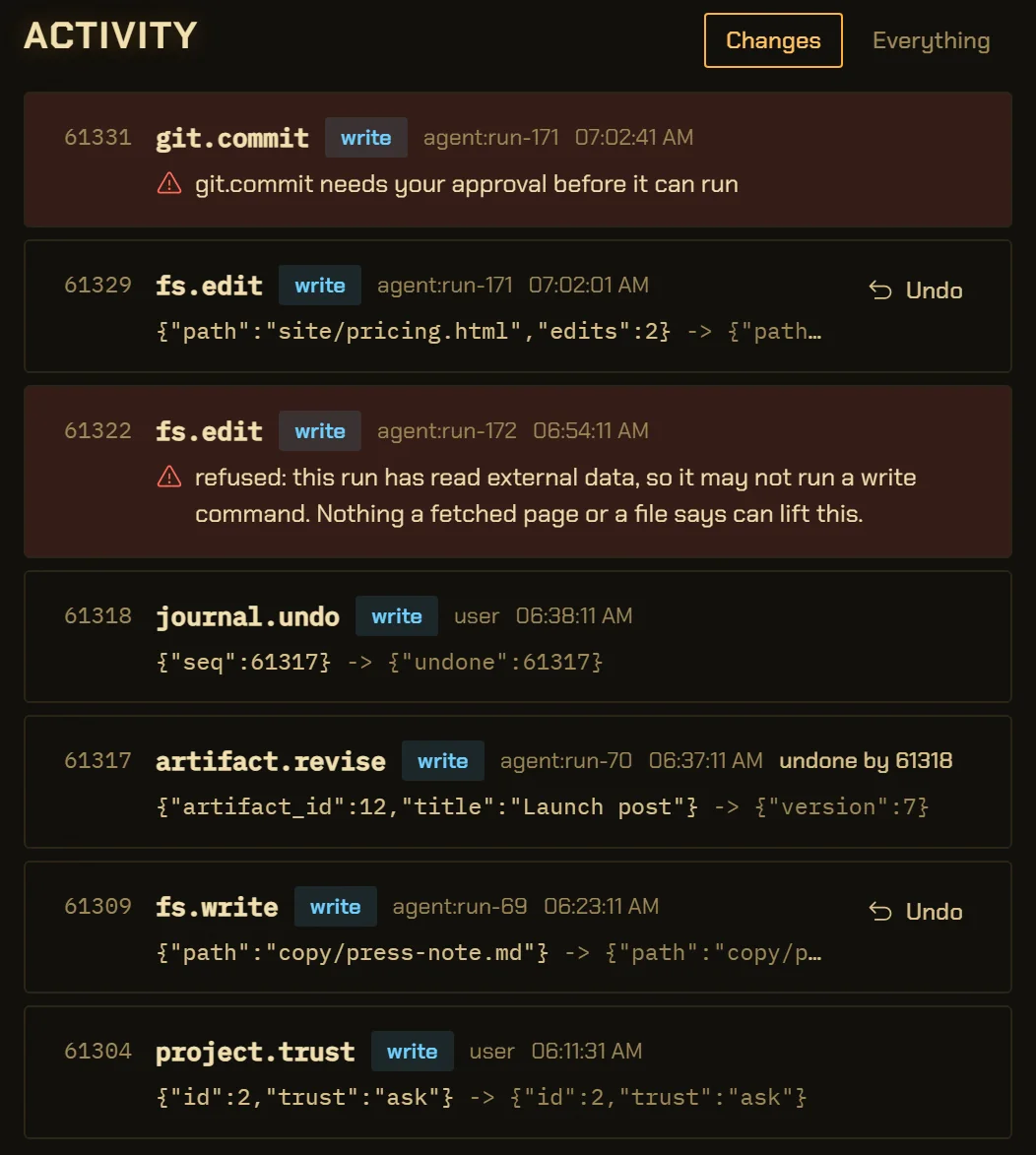
Everything you and the agents do goes through one command bus and lands in one journal, refusals included. Undo is an ordinary command off a row, so it survives a restart and passes the same checks.

Only what can be put back: a push, a sent message or a submitted form has left the machine.

One bus, one journal
The Activity view of the journal. Rows, newest first: a git.commit waiting for approval, an fs.edit by an agent with an Undo button, a refused fs.edit in red with the full refusal, a journal.undo by the person, the artifact revision it undid, a file write with Undo, and a project.trust change.
04

A shell Windows fences in.

Running a program asks at Always ask and Normal; only god mode lifts that. Each command gets a write-restricted token inside a job object: it can write to the project and toolchain caches, and it dies when the app closes.

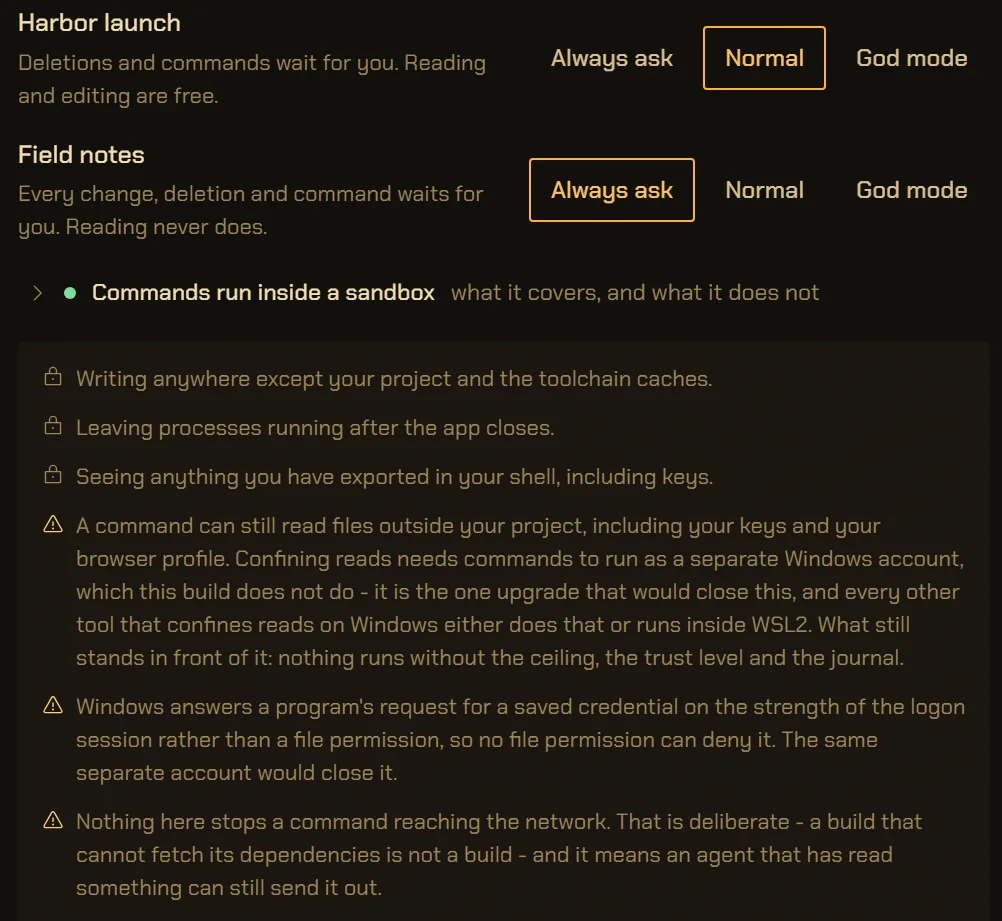
It does not confine reads or the network, and the settings screen says so in those words.

The sandbox, when it codes
Settings, Trust, per-folder permissions. Two folders, Harbor launch on Normal and Field notes on Always ask, each with Always ask, Normal and God mode buttons. Below, unfolded: commands run inside a sandbox, what it confines, and three warnings in the sandbox’s own words, that a command can still read files outside the project, that saved Windows credentials cannot be denied by a file permission, and that nothing stops a command reaching the network.
05

A connected server asks you, not the model.

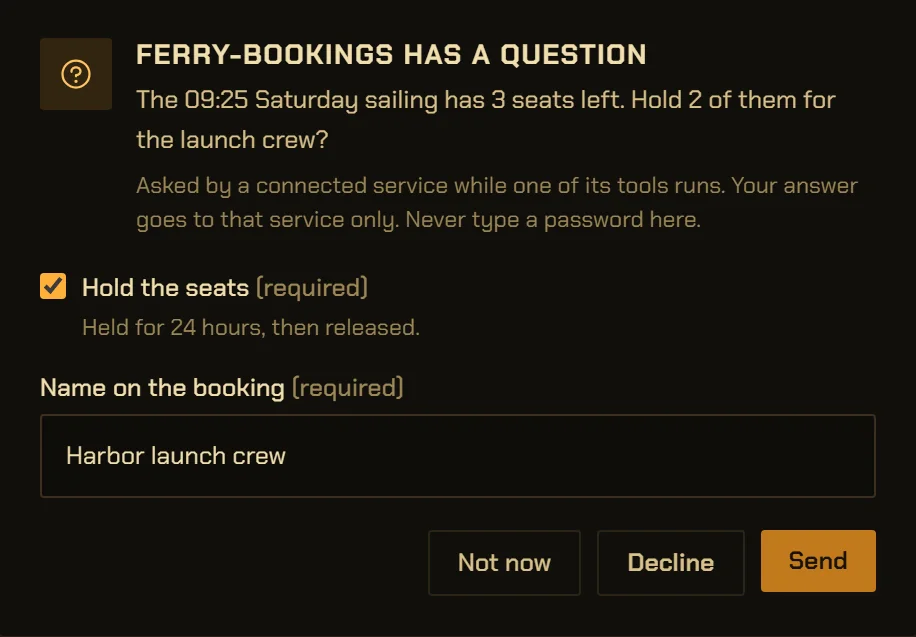
An MCP server you connect can stop mid-call to ask a question. The form comes to you, and your answer goes to that server only: not to the model, and not into the journal.

A tool that acts asks the first time, and any standing allow is a switch you can see and take back.

Every command, listed
A dialog over the app window: ferry-bookings has a question. The 09:25 Saturday sailing has 3 seats left; hold 2 of them for the launch crew? A note says it was asked by a connected service while one of its tools runs, the answer goes to that service only, and never to type a password. A checkbox to hold the seats, a name field, and Not now, Decline and Send.
Also in the code

Commit and push always ask.

git.commit and git.push stop for you at every trust level, god mode included. Work is reversible; a commit is a claim about what happened, and that is yours to make.

vb-bus/src/policy.rs · RECORDSThe commit card, when it codes

Only the folders you added.

Every file command resolves its path through one function, paths::locate, which resolves .. and symlinks before it checks, and refuses anything outside a project you added.

vb-cmd-fs/src/paths.rs

Edits match once or fail.

fs.edit replaces an exact passage in a file the run has read, and only if it appears exactly once. The read is checked in the journal, so a summarised conversation cannot forget it.

vb-cmd-fs/src/edit.rs

A document runs nothing.

The Canvas renders in a frame with an empty sandbox: no scripts, no forms, no navigation. The opt-in Live preview allows scripts, and its policy refuses every fetch, including one aimed at the app.

ui/src/Canvas.tsx

Your key stays in Windows.

The OpenRouter key and connection tokens live in the operating system’s credential store. A command carrying a credential can never be approved into running, because an approval stores its input as it will run.

vb-llm · keyring; vb-bus/src/bus.rsThe key, on Models
Not in the app

The window loads nothing from the internet, and nothing goes to us, because there is nowhere for it to go. What does leave: the prompt and context you send to the model you picked, through OpenRouter; a page you or the agent open; and calls to a server you connected. This website is separate and says what it measures on Privacy.

At a glance

Trust, by the numbers.

Commands that reach outside
Nine: web.fetch, four browser.* and four pane.*. Any of them marks the run external for the rest of that run.vb-cmd-core · exactly_these_commands_reach_outside_the_trust_boundary
Trust levels
Three, per folder or per conversation: Always ask, Normal, God mode. Reading never asks.ui/src/levels.ts
Always ask, at any level
git.commit and git.push. Clicks and typing in the browser pane, and actions on a connected server, ask unless you grant them separately.vb-bus/src/policy.rs · RECORDS, ACTS_OUTWARD
Runs an incoming message starts
Tainted from the first step. May propose fs.edit or fs.write, which always wait for you, and may make a new Canvas document. Any other write, deletion or command is refused.vb-bus/src/policy.rs · REVIEWED_WHEN_TRIGGERED, CREATES_WHEN_TAINTED
The shell sandbox
Write-restricted token in a job object, kill-on-close, allowlisted environment. Running a program asks at Always ask and Normal; god mode lifts that, and only inside the box.vb-sandbox; vb-agent/src/role.rs · PERSON_CEILING
Questions from a server
At most 20 fields and 3 open per server. Unanswered after 10 minutes, it is cancelled.vb-cmd-mcp/src/elicit.rs
Backups
A whole-database copy on request. The app keeps 5 copies taken before updates, and a restore keeps what it replaces.vb-cmd-core · app.backup; vb-db/src/lib.rs
Window network policy
Content security policy allows fonts, scripts and connections from the app itself only.crates/vb-app/tauri.conf.json
Telemetry
None. No analytics or crash-reporting library in the app’s dependencies.Cargo.toml, ui/package.json

The details,
for the careful.

Can a web page give the agent orders?

It can say anything, but it cannot authorise anything. Reading a page marks the run external, and an external run is refused every change to what already exists, every deletion and every command until the person’s next message. It may still make something new, a Canvas document or a .md, .txt or .csv file under the project’s web/ folder, and both stay marked as from the web. The limit is on actions: a model can still be misled about what it says, so read a summary of an untrusted page as a summary of an untrusted page.

Does the sandbox stop a command reading my files?

No. On Windows, confining reads needs commands to run as a separate Windows account, which this build does not do. A command can read files outside the project, including keys and browser profiles, and can reach the network. The app shows these limits in the sandbox’s own words under Settings, Trust. The sandbox, when it codes

What does god mode switch off?

Only the asking for ordinary work. The sandbox, commit and push asking, the taint rule, the spending ceiling, person-only commands and the browser pane’s own permission all stay. In the app’s words, god mode means do not interrupt me while you work; it never means decide for me what counts as done.

Can the agent approve its own actions or raise its own trust level?

No. Approving, setting a trust level and changing the approval policy are person-only commands. A run that asks for one is refused before anything happens.

What can a connected MCP server do?

Whatever its tools do, behind the same gate: a tool that acts asks the first time, and standing allows are switches in Settings, Connections. What it returns is read as data. It may ask you a question mid-call, and your answer goes only to that server. It may not ask the app for a model completion; that request is refused. The full command list

Does VectorBrain send telemetry or crash reports?

No. The app has no analytics and no crash reporting, because there is no VectorBrain server to send them to. The window loads no fonts or scripts from the internet. The marketing website is a separate thing, and its analytics are described on the Privacy page. Privacy

How do I back up or restore my data?

Settings, You, Your data saves a whole copy of the database into ~/VectorBrain/backups. Restoring replaces the data with a backup and restarts the app, and first keeps what it replaces as a backup of its own. Before each database update the app also keeps a copy, the last five.

Does the app make any accessibility claim?

No. The build has not been measured against a conformance level, so this site states none.

Let it near your files.
With the limits in code.

Every rule on this page is enforced in the command bus, checked on every call, and visible in the journal.