
244 commands.
One list, for you and the agent.
Everything VectorBrain can do is a registered command with one summary. You read that line in the palette, and the model is handed the same line.
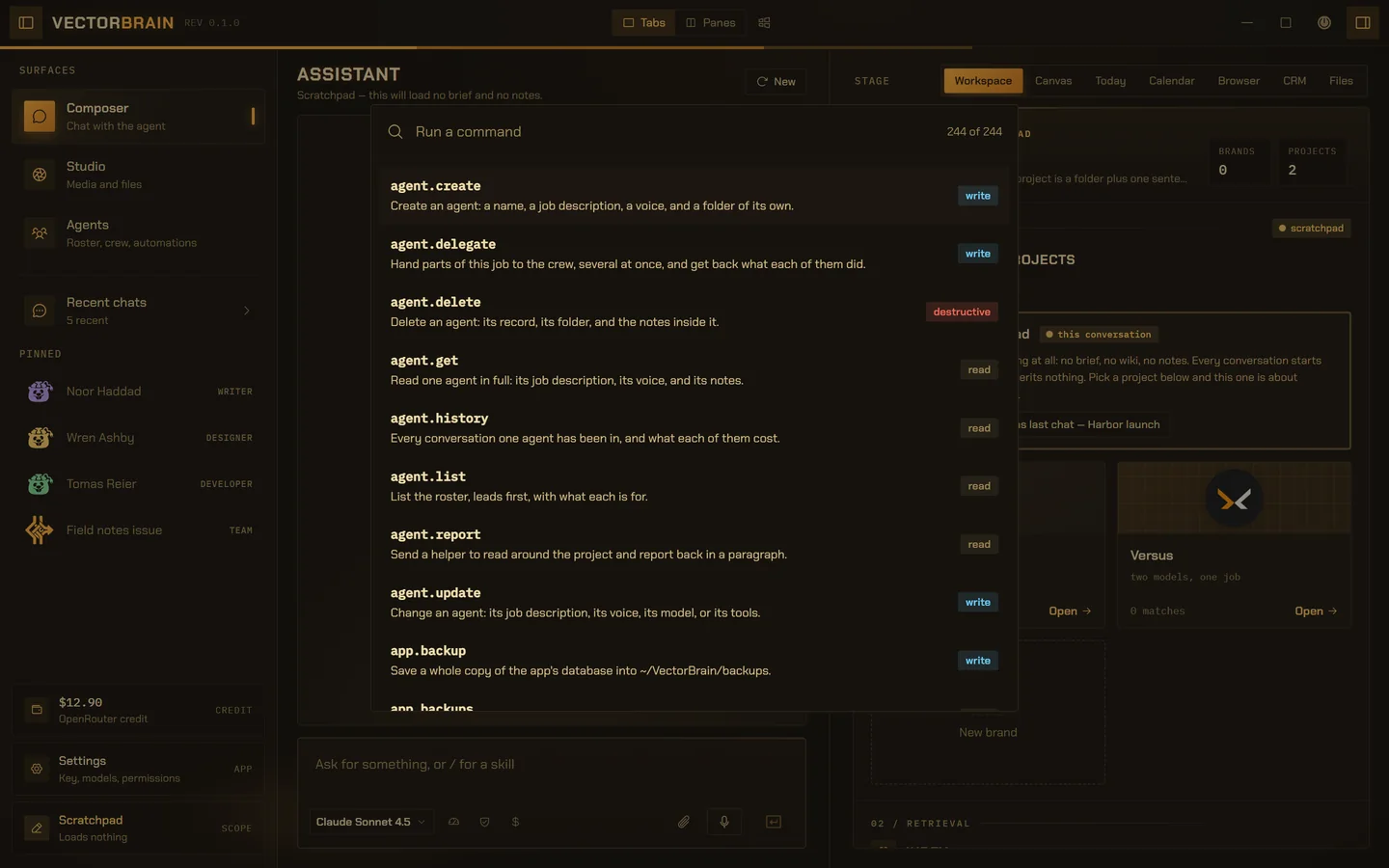
The palette is VectorBrain’s real interface, and the 244 commands in it are the real registry, read from source on 2026-09-25. The window behind it runs on example data.
Every command says how far it reaches.
Effect is set on the command, not guessed from the call. Destructive and exec stop and show you the exact input before an agent runs them, by default. That is 29 of the 244.
Each command also declares whether it can be undone, whether only a person may run it, where its result comes from, and which fields must never be written down.
- 105read
Looks, changes nothing.
- 110write
Creates or changes something recoverable.
- 23destructive
Removes something, or changes it for good. Asks first.
- 6exec
Runs a program. Asks first.
Search it by what it does.
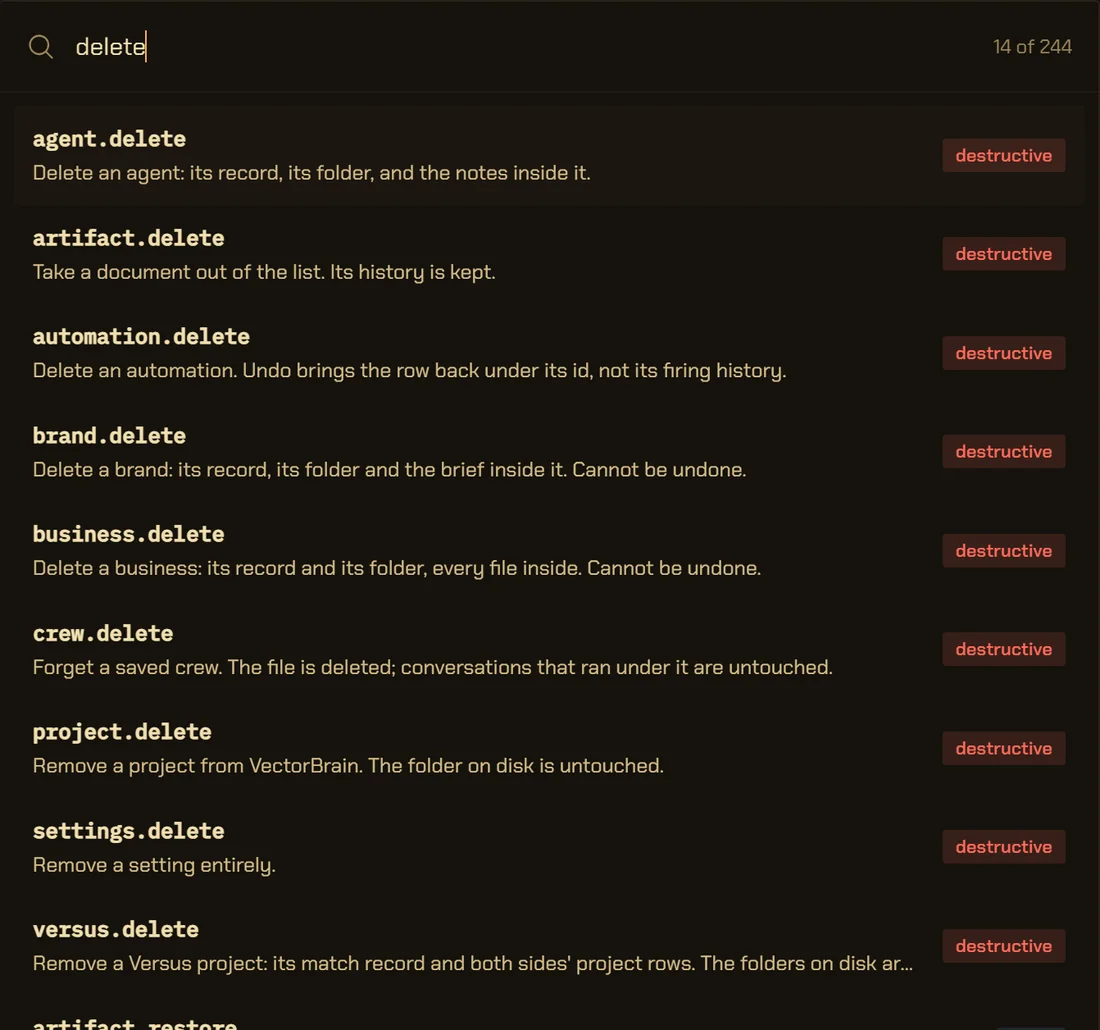
Ctrl+K searches names and summaries. The summaries say the limit next to the action: which folder is untouched, what undo brings back, what cannot be undone.
delete
- approve its own action
- start another run
- set how often it is asked
- trust a project
- tick a companion’s box
- restore a backup
- top up your credit
- store a server’s token
69 of the 244 commands are marked person-only. The bus refuses them to any agent run on that flag alone, before an approval card exists, so no model can sign off its own work. Where the bus checks it.
The registry, in numbers.
- Commands
- 244, in 47 namespaces
CommandSpec, crates/*/src - By effect
- 105 read, 110 write, 23 destructive, 6 exec
vb-core/src/permission.rs - Ask a person first by default
- 39: every destructive and exec command, plus 10 that ask whatever their effect
vb-bus/src/policy.rs - Person-only
- 69, refused to any agent run
vb-bus/src/bus.rs - Declare an undo
- 74, reversed by journal.undo through the bus
vb-bus/src/builtin.rs - Taint the run
- 9 foreign commands: web and browser reads
vb-core/src/provenance.rs - Return project content
- 55, wrapped as data before a model reads it
vb-core/src/provenance.rs - Fields never journalled
- content on mcp.answer, value on mcp.secret.set and api_key on provider.key.set
vb-bus/src/registry.rs - Open to a connected program
- 20, each behind a box you tick
vb-bus/src/policy.rs - Conversation ceiling
- Exec for every conversation you start. The trust level decides what asks; helpers keep fixed, lower ceilings.
vb-agent/src/role.rs · PERSON_CEILING
All 244, by namespace.
Read from the desktop source on 2026-09-25: every CommandSpec the build registers, test code excluded, with each summary exactly as written. The app will export its own registry, and that file will replace this one. Why everything is a command.
agent.* 8 commands
agent.create
Create an agent: a name, a job description, a voice, and a folder of its own.
writecompanion: roster
agent.delegate
Hand parts of this job to the crew, several at once, and get back what each of them did.
write
agent.delete
Delete an agent: its record, its folder, and the notes inside it.
destructive
agent.get
Read one agent in full: its job description, its voice, and its notes.
readcompanion: look
agent.history
Every conversation one agent has been in, and what each of them cost.
read
agent.list
List the roster, leads first, with what each is for.
readcompanion: look
agent.report
Send a helper to read around the project and report back in a paragraph.
read
agent.update
Change an agent: its job description, its voice, its model, or its tools.
writeundocompanion: roster
app.* 8 commands
app.backup
Save a whole copy of the app's database into ~/VectorBrain/backups.
writeperson only
app.backups
List the database backups there are to restore from, newest first.
readperson only
app.info
Report the app version, platform, and security posture.
readcompanion: look
app.pick_file
Open the system's own file window and hand back the file the person chose, or nothing when they canceled.
readperson only
app.pick_folder
Open the system's own folder window and hand back the folder the person chose, or nothing when they canceled.
readperson only
app.quit
Shut VectorBrain down completely. Closing the window only hides it; this is the real off switch.
execperson only
app.restore
Replace the app's data with a backup and restart. What it replaces is kept as a backup of its own.
destructiveperson only
app.save_copy
Open the system's own Save window and copy a file from a project to wherever the person chose. Hands back the saved path, or nothing when they canceled.
writeperson only
approval.* 4 commands
approval.amend
Change what a pending action will run, before allowing it.
writeperson only
approval.decide
Allow or refuse an action the agent is waiting on.
writeperson only
approval.list
Show actions the agent is waiting to be allowed to take.
read
approval.policy
Say how often one command asks before it runs, or go back to the usual.
writeundoperson only
artifact.* 15 commands
artifact.cells
Read a sheet as shown: every formula worked out, formatted and styled.
read
artifact.contrast
Measure the contrast ratio between color pairs, to WCAG 2.1.
read
artifact.create
Write a new document: markdown, HTML, a slide deck, or a spreadsheet.
writeundo
artifact.delete
Take a document out of the list. Its history is kept.
destructiveundo
artifact.edit_cells
Change cells, rows, columns or sheets of a spreadsheet, keeping the previous version.
writeundo
artifact.edit_element
Replace one element of an HTML document, leaving the rest alone.
writeundo
artifact.element
Read one element of an HTML document by its data-fl-id.
read
artifact.export
Write a document to a real file: PDF as rendered, DOCX, PPTX as slides, XLSX from its tables.
write
artifact.get
Read a document, with the element map for its HTML.
read
artifact.list
List documents, most recently changed first.
read
artifact.restore
Put a deleted document back in the list.
writeundo
artifact.retune
Change one CSS design token of an HTML document, keeping the previous version.
writeundo
artifact.revise
Replace a whole document, keeping the previous version.
writeundo
artifact.rollback
Bring back an earlier version as the newest one.
writeundo
artifact.versions
List a document's version history, newest first.
read
automation.* 13 commands
automation.check
Check a connection trigger now: ask its read-only tool and fire once per new item that matches.
readperson only
automation.create
Create an automation: a prompt scheduled for an agent or team, or a reminder notification.
writeundoasks first
automation.delete
Delete an automation. Undo brings the row back under its id, not its firing history.
destructiveundo
automation.fire
Fire an automation now: record the firing, move it on to its next moment, and start the run or show the reminder.
writeperson only
automation.get
Read one automation by id, including its schedule in words and cost line.
read
automation.history
List firings for an automation or across all automations, newest first.
read
automation.list
List automations, optionally filtered by project or active state.
read
automation.pause
Pause an active automation.
writeundo
automation.preview
The time now, and what a proposed automation would mean: its schedule in words, when it fires, what it can cost.
read
automation.resume
Resume a paused automation, clearing failures and recomputing due time.
writeundo
automation.run_now
Trigger an automation to fire immediately.
writeasks first
automation.seen
Mark what an automation produced as looked at, so it stops counting as waiting on you.
write
automation.update
Update an existing automation: change its schedule, prompt, model, or who runs it. Null clears a field.
writeundoasks first
brand.* 6 commands
brand.create
Create a brand: a name and a brief that will ride every project tied to it.
write
brand.delete
Delete a brand: its record, its folder and the brief inside it. Cannot be undone.
destructive
brand.get
Read one brand and the brief it carries.
read
brand.list
List brands with how many projects each carries.
read
brand.logo
Give a brand the logo its invoices print, from a PNG or JPEG on disk; take it off; or put back the one replaced.
writeundoperson only
brand.update
Change a brand: what it is called, the brief it carries, its billing or its invoice colours.
writeundo
browser.* 4 commands
browser.capture
Photograph one public https page as a browser renders it, into the project.
writeundotaints the run
browser.read
Open one public https page in a real browser, run its scripts, and read it.
readtaints the run
browser.reopen
Read a page saved in the project's web folder, at the same cost as fetching it.
readtaints the run
browser.save
Open one public https page and write it to the project's web folder.
writetaints the run
build.* 3 commands
build.list
List this project's build pages: what each part is, and which files it covers.
read
build.sync
Rewrite the build pages describing what has changed, and stage them for the commit.
write
build.write
Write or rewrite one build page: what a part of this project is, and which files to open.
writeundo
business.* 13 commands
business.create
Create a business: a named folder of contacts, deadlines, invoices and expenses.
writeperson only
business.dashboard
One business at a glance: owed, this month, overdue, due this week, and what to do next.
read
business.delete
Delete a business: its record and its folder, every file inside. Cannot be undone.
destructiveperson only
business.discard_import
Delete the files one import wrote. The stored inverse of business.import_csv.
destructive
business.export_csv
Write a business's contacts, deadlines, deals, invoices and expenses out as five CSV sheets.
write
business.get
Read one business: header, notes, contacts, deadlines, quotes, invoices, expenses and hours.
read
business.import_csv
Import contacts or expenses from a CSV file: one file per row, with a map saying which heading is which key.
writeundoperson only
business.import_preview
Look at a CSV before importing it: its format, a suggested map, a sample and duplicates.
readperson only
business.list
List businesses with how many projects and contacts each carries.
read
business.overview
Where a business's money is: kept, owed and how late, what is coming in the next 90 days, and the monthly running costs.
read
business.tie
Tie a project to one client of one business, so that file rides its turns; or untie.
writeundoperson only
business.totals
Add up one business: invoiced, paid, unpaid and spent, per currency.
read
business.update
Change a business: name, brand, currency, terms, the payment sentence or the notes.
writeundo
chat.* 8 commands
chat.budget
Set the dollar ceiling for a conversation, or the one new conversations start with.
writeundoperson only
chat.cancel
Stop a run that is in flight.
write
chat.history
Read one conversation, its run, what that run cost, and anything it is waiting on.
readcompanion: look
chat.list
List conversations, most recently used first, each with its latest run's status.
readcompanion: look
chat.search
Find past conversations by something that was said in one.
read
chat.send
Send a prompt and let the agent work until it is done.
writeperson onlycompanion: agents
chat.set_project
Say which project a conversation is about, or move it back to a scratchpad.
writeundoperson only
chat.trust
Set how much this conversation is asked before the agent acts.
writeundoperson only
commands.* 1 command
commands.list
List every command registered on the bus.
read
companion.* 4 commands
companion.connect
Point Claude Code, Codex or Claude Desktop at this app by writing the entry into its own settings file.
writeundoperson only
companion.disconnect
Take this app out of a program's settings file again.
writeundoperson only
companion.grant
Tick or untick one box for one connected program: the Studio, your agents, or setting up agents and teams.
writeundoperson only
companion.status
Whether the door is open, what a connected program may do, and which programs point at this app.
read
contact.* 4 commands
contact.bulk
Change many contacts at once: business or personal, status, or a tag, undone in one step.
writeundo
contact.get
Read one contact in full: header, address, notes, the whole log and what they owe.
read
contact.list
Find contacts in a business by words, business or personal, and status, a page at a time.
read
contact.log
Add one dated line to a client's log, under its file's Log heading.
writeundo
crew.* 8 commands
crew.approve
Sign off the crew for this conversation. Only after this can anybody be handed work.
writeperson only
crew.create
Put a team together by hand: a lead, who is on it, and what each one is asked for.
writeperson onlycompanion: roster
crew.delete
Forget a saved crew. The file is deleted; conversations that ran under it are untouched.
destructive
crew.list
The crews kept from earlier jobs, with who was on each and what they were asked for.
readcompanion: look
crew.propose
Draft the crew for this job: who to bring in, and what each of them will do.
write
crew.save
Keep this conversation's crew to start the next job from. Saves the briefs, never the findings.
writeperson only
crew.staff
Decide once how this conversation is staffed: a crew you approve, or anybody on your roster.
writeperson only
crew.update
Change a team you keep: its name, what it is for, its lead, who is on it and what each is asked for.
writeperson onlycompanion: roster
dev.* 6 commands
dev.configure
Confirm how this project's dev server is started.
writeasks first
dev.list
The dev servers configured for this project, what is running, and what could be configured.
read
dev.read
Read a page this project's dev server is serving, to check your own work.
read
dev.start
Start this project's dev server and leave it running.
exec
dev.status
Whether this project's dev server is running, since when, and where its log is.
read
dev.stop
Stop this project's dev server.
write
draft.* 1 command
draft.card
Show a drafted text as a card in the conversation with a Copy button; only the text itself goes in it.
read
fs.* 12 commands
fs.browse
List every known root and its files, for the window's explorer. Person-only.
readperson only
fs.dirs
List what is inside one folder, for the window's picker. Person-only.
readperson only
fs.discard
Delete files that were imported. The stored inverse of fs.import.
destructive
fs.edit
Replace exact passages in a file. Each must appear exactly once. Several disjoint ones can go in one call.
writeundo
fs.import
Copy files from anywhere on disk into a project, so they can be worked with. Person-only.
writeundoperson only
fs.list
List a folder in the project, skipping ignored files.
read
fs.move
File something into a project, or move it between folders. The file moves; nothing is copied.
writeundo
fs.open
Open a file in whatever program this machine opens that kind with.
execperson only
fs.preview
Serve one file from any known root for display. Person-only.
readperson only
fs.read
Read a file from the project as text: plain text and code, PDFs, and Word, Excel and PowerPoint files.
read
fs.restore
Put a file back from a copy kept when it was last replaced. What undoing a large save replays.
writeundo
fs.write
Create a file, or replace one whole file's contents.
writeundo
git.* 4 commands
git.commit
Stage the named files and commit them with a message.
writeasks first
git.diff
Show the changes in the project as a unified diff.
read
git.push
Push the current branch to its remote.
writeasks first
git.status
Show the branch and what has changed in the project.
read
hours.* 1 command
hours.bill
Bill one client's unbilled hours into one invoice, a line per file or per day, and mark them billed.
writeundo
idea.* 8 commands
idea.create
Keep an idea as a page, undecided, without choosing what it is for yet.
writeundo
idea.discard
Delete an idea page. The stored inverse of keeping one; it deletes nothing outside an ideas folder.
destructiveundo
idea.gather
Propose what comes along when an idea becomes a project: ideas, shelf files, chats, media. Writes nothing.
read
idea.list
Every idea and every project deadline, as facts read from their headers.
read
idea.month
One month of what you owe, what the app promised, and what your connected calendar says. Writes nothing.
read
idea.promote
Make an idea a project: a folder, the page as its brief, and the ticked ideas, files and chats carried in.
destructive
idea.today
What is next, what is due this week, the inbox, what went quiet, and what ran while you were away.
read
idea.update
Move an idea on the ladder: retitle it, give it a date, mark it now, active, done or parked.
writeundo
index.* 7 commands
index.clear
Forget everything indexed for a project.
destructive
index.embedding
Which model the index is built with, what else it could be, and what changing it would cost.
read
index.embedding.set
Choose the model the index is built with. Every vector already paid for stops being comparable.
destructiveundo
index.search
Find passages in the project by meaning and by keyword at once.
readcompanion: look
index.status
Report what the local index holds for a project.
read
index.sync
Read a project into the local index, skipping files that have not changed.
write
index.watching
Say which folders the index keeps current on its own, and why.
read
invoice.* 4 commands
invoice.credit
Issue a credit note against a sent invoice: a negative file that reduces what is owed.
writeundo
invoice.draft
Start an invoice: claim its number and write the file, lines and totals worked out.
write
invoice.export
Print one invoice to a PDF beside its file, wearing the business's brand.
write
invoice.pay
Mark an invoice paid, or part paid by an amount; the app adds the amounts up.
writeundo
journal.* 2 commands
journal.list
Show recent commands, newest first.
read
journal.undo
Reverse a journalled command by replaying its inverse.
write
librarian.* 1 command
librarian.sweep
Read one conversation that has gone quiet and propose what to keep.
writeperson only
llm.* 1 command
llm.chat
Send a prompt to the selected model and stream the reply.
read
mcp.* 19 commands
mcp.add
Connect an MCP server: a URL, a program with arguments, or the mcpServers snippet from its README.
writeundoasks first
mcp.agent_owned
Mark a connected server as the agent's own account rather than the person's.
writeundoperson only
mcp.allow
Let one MCP tool act without asking, or take that back.
writeundoperson only
mcp.answer
Answer, decline or dismiss a question a connected server asked the person.
writeperson onlynot journalled: content
mcp.asks
The questions connected servers are waiting for the person to answer.
readperson only
mcp.autonomy
Let every tool on an MCP server act without asking, or take that back.
writeundoperson only
mcp.call
Call one tool on a connected MCP server.
readasks first
mcp.enable
Switch an MCP server, or one of its tools, on or off.
writeundo
mcp.get_prompt
Fetch one prompt template from a connected MCP server, filled in with its arguments.
read
mcp.list
The MCP servers connected to this app, whether each is up, and how many tools each has.
read
mcp.login
Sign in to a remote MCP server in the browser, and keep the sign-in.
execperson only
mcp.logout
Forget a remote MCP server's sign-in.
destructiveperson only
mcp.preload
Choose whether a server's full tool schemas ride from the start of a run.
writeundoperson only
mcp.prompts
The prompt templates one connected MCP server offers, with the arguments each takes.
read
mcp.read_resource
Read one resource from a connected MCP server by its URI.
read
mcp.remove
Disconnect an MCP server and forget it, its tools and its secrets.
destructiveundo
mcp.resources
The resources and resource templates one connected MCP server offers to read.
read
mcp.secret.clear
Remove a stored token or environment value for an MCP server.
destructiveperson only
mcp.secret.set
Store a token or an environment value for an MCP server in the OS credential store.
writeperson onlynot journalled: value
media.* 11 commands
media.discard
Delete generated media files. The stored inverse of a generation.
destructive
media.embed
An artifact with its media/ pictures put inline, for drawing in the window.
readperson only
media.image
Generate images from a prompt and save them under the project's media folder.
writeundocompanion: studio
media.import
Save image bytes (base64) into the media folder as a file generations can reference.
writeundo
media.measure
Learn what a transcription model charges per minute by transcribing a three-second clip. Person-only.
readperson only
media.read
Read a media file as a data URI so the window can display it.
readperson only
media.recent
List recent media generations from the journal, newest first.
readcompanion: look
media.sound
Compose music or sound from a description and save the clip.
writeundocompanion: studio
media.speech
Read text aloud with a speech model and save the audio.
writeundocompanion: studio
media.transcribe
Turn a recording into text, from a project file or supplied base64 audio.
readcompanion: studio
media.video
Generate a video clip from a prompt, waiting out the provider's job, and save it.
writeundocompanion: studio
memory.* 7 commands
memory.brief
Read the brief that is loaded into every conversation about this project.
read
memory.discard
Turn down a suggested note, so it is not proposed again.
writeundoperson only
memory.homes
Show where notes are kept: the project brief, its design sheet, its wiki, the library, and the ideas home.
read
memory.keep
Keep a suggested note, as written or with your own wording.
writeundoperson only
memory.promote
Keep something: into this project's brief, its design sheet, its wiki, or the global library.
writeundo
memory.suggest
Propose a note for this person to keep, without keeping it.
write
memory.suggestions
List the notes waiting to be kept or turned down.
read
mode.* 2 commands
mode.list
List the modes a conversation can run in.
read
mode.select
Choose the mode the next new conversation starts in.
writeundo
model.* 2 commands
model.current
Report the model and effort a prompt would run at right now.
read
model.select
Choose the model, the effort level, or both.
writeundo
models.* 3 commands
models.browse
List the catalog grouped by vendor, sorted by price, cache price, context, release or a published score.
read
models.list
Search the cached model catalog by id or name, optionally within one craft.
readcompanion: look
models.sync
Fetch the live model catalog from OpenRouter and replace the cached copy.
write
notify.* 1 command
notify.show
Show an OS notification toast with a title and message.
read
pane.* 11 commands
pane.act
Perform one action on the page in the browser pane - click, fill, press a key, or scroll - and read what the page became. Stops for the person's approval unless they have granted autonomy.
readasks firsttaints the run
pane.autonomy
Grant or withdraw the standing permission for agents to act in the browser pane without asking.
writeundoperson only
pane.capture
Photograph what the browser pane's front tab is showing into the project's media folder.
writeundoperson onlytaints the run
pane.dev
Put this project's running dev server on the stage, so the person can see it.
read
pane.find
Find text on the page in the browser pane's front tab and select the next match. The window's find bar.
readperson only
pane.open
Send the browser pane's front tab to one public https page, step it back or forward, reload or stop it, or park it on its start screen.
readtaints the run
pane.place
Position the browser pane over the stage, or hide it. The window's own plumbing.
readperson only
pane.read
Read the page the browser pane's front tab is showing: its text, and a numbered map of what can be clicked or filled. The numbers are minted fresh on every read.
readtaints the run
pane.status
Where the browser pane is: address, title, and whether it is loading.
read
pane.tab
Open, close, switch or list the browser pane's tabs. Every other pane command works in the tab in front, and switching brings a tab to the front where the person sees it.
read
pane.zoom
Scale the page in the browser pane's front tab. The window's zoom control.
readperson only
pin.* 1 command
pin.set
Replace the pinned agents and teams in the drawer, in the order they should appear.
writeundoperson only
project.* 8 commands
project.access
Lock a project to read-only, or unlock it again.
writeundoperson only
project.create
Create a new folder and add it as a project.
writeundo
project.delete
Remove a project from VectorBrain. The folder on disk is untouched.
destructiveundo
project.list
List the projects the person has added, newest first.
readcompanion: look
project.map
A map of the project: its files ranked, with the definition lines of the parts other files depend on.
read
project.open
Add a folder on disk as a project, optionally tied to a brand.
writeundoasks first
project.state
Where the work stands: branch, changed files, and the last command this conversation ran.
read
project.trust
Set how much this project is asked about before the agent acts.
writeundoperson only
provider.* 5 commands
provider.balance
Report the OpenRouter account's remaining credit, in USD.
read
provider.key.clear
Remove the stored OpenRouter API key from this machine.
destructive
provider.key.set
Store the OpenRouter API key in the operating system credential store.
writenot journalled: api_key
provider.status
Report whether an OpenRouter key is set, and optionally check it works.
read
provider.topup
Open the OpenRouter credits page in the system browser, to add funds.
execperson only
quote.* 3 commands
quote.accept
Accept a quote: draft the invoice from its lines, number claimed by the app, and link the two.
writeundo
quote.draft
Start a quote: claim its number and write the file, lines and totals worked out.
write
quote.export
Print one quote to a PDF beside its file, wearing the business's brand.
write
sandbox.* 2 commands
sandbox.status
Say what confines commands on this machine, and what it does not.
read
sandbox.sweep
Remove every folder permission this app has granted itself.
destructive
search.* 1 command
search.text
Find text across the project, skipping ignored files.
read
settings.* 4 commands
settings.delete
Remove a setting entirely.
destructiveundo
settings.get
Read one setting by key.
read
settings.list
List every setting and its value.
read
settings.set
Set one setting to a value. The value may be any JSON.
writeundo
shell.* 1 command
shell.run
Run one command inside the project and capture its output.
exec
skill.* 4 commands
skill.create
Save a new skill as a file, in this project or in the global library.
writeundo
skill.get
Read one skill in full, including the instructions it adds to a run.
read
skill.import
Copy a skill file from anywhere on disk into this project or the library. Person-only.
writeperson only
skill.list
List the skills a conversation can be run with, project ones first.
read
team.* 3 commands
team.retry
Send a crew member again, with the brief they were given the first time.
writeperson only
team.status
Who is working on this conversation's job, what each is doing, which files each has changed, and what it has cost.
read
team.transcript
Read one crew member's record: what they were sent, and everything they did.
read
tools.* 1 command
tools.search
Find commands by name or description.
read
versus.* 7 commands
versus.begin
Fix a Versus project's mode and two models and open its two conversations, ready for versus.send. Once only.
writeperson only
versus.create
Make a Versus project: two sibling project folders, "<name> vs1" and "<name> vs2", where two models race the same job.
writeundoperson only
versus.delete
Remove a Versus project: its match record and both sides' project rows. The folders on disk are untouched.
destructiveperson only
versus.list
Every Versus project, newest first, with each side's folder, model and measured facts.
read
versus.pick
Record which side of a Versus project won, or clear the pick. Archives nothing.
writeundoperson only
versus.send
Send one message to both sides of a Versus project at once, and wait for both runs.
writeperson only
versus.tidy
Tidy up a finished Versus project: remove the named sides' project rows (folders stay on disk) and mark the match done.
destructiveperson only
web.* 1 command
web.fetch
Read one public https page and return it as text.
readtaints the run
you.* 1 command
you.set
Set what the model calls you and how you want to be spoken to, on every turn.
writeundoperson only
The details,
for the careful.
How many commands does VectorBrain have?
244 registered commands in 47 namespaces, counted from the desktop source on 2026-09-25. 105 only read, 110 write something recoverable, 23 are destructive and 6 run a program. The largest namespaces are mcp (19), artifact (15) and automation (13).
Can the agent do everything I can?
No. 69 of the 244 commands are person-only, and the bus refuses them to any agent run before an approval card exists, among them approval.decide, chat.send and project.trust. Of the rest, 39 stop and ask you by default: every destructive and exec command, plus 10 that ask whatever their effect, such as git.commit and project.open, where the per-command setting that can quiet the others is not consulted. Every conversation you start has the same ceiling, exec, so what stops is decided by your trust level: running a program asks at Always ask and Normal, and only god mode lifts that.
Which commands are destructive?
23 of them: agent.delete, app.restore, artifact.delete, automation.delete, brand.delete, business.delete, business.discard_import, crew.delete, fs.discard, idea.discard, idea.promote, index.clear, index.embedding.set, mcp.logout, mcp.remove, mcp.secret.clear, media.discard, project.delete, provider.key.clear, sandbox.sweep, settings.delete, versus.delete and versus.tidy. 7 of those declare an undo (artifact.delete, automation.delete, idea.discard, index.embedding.set, mcp.remove, project.delete and settings.delete). By default, an agent that calls any destructive command waits for a person to approve the exact call.
Which commands run programs?
6: app.quit, dev.start, fs.open, mcp.login, provider.topup and shell.run. shell.run is the only one that runs an arbitrary command line, inside the open project, and it asks every time at Always ask and Normal trust. Only god mode lifts that, and only inside the sandbox.
Can I undo what the agent did?
74 commands declare an inverse, and journal.undo replays the stored inverse through the bus, so the undo is itself a journalled, permission-checked command. Whether one particular call can be undone is decided by its own journal row, because a call may have changed nothing.
What happens after the agent reads a web page?
9 commands return foreign content: browser.capture, browser.read, browser.reopen, browser.save, pane.act, pane.capture, pane.open, pane.read and web.fetch. Reading any of them taints the run for the rest of its life: it may still read and make something new, a Canvas document or a .md, .txt or .csv file under the project’s web/ folder, but it can no longer change anything that already exists, delete or execute, and no approval lifts that. Files in a project you opened are different: they are wrapped as data, but the run keeps its authority, so it can still make the change you asked for.
Does the journal keep my API key?
No. 3 commands name input fields the bus blanks before the call is journalled: mcp.answer (content), mcp.secret.set (value) and provider.key.set (api_key). The rule is on the command, so no handler has to remember it.
Can Claude Code or Codex run these commands?
A connected program can reach 20 of them, and only under the box you tick for it: looking at your agents, chats and projects, making media in the Studio, handing a job to your agents with chat.send, and setting up agents and crews. Every other command is on no companion list at all, whatever the settings say.
Where do these descriptions come from?
Each one is the summary string written on the command in the app’s source. The palette shows you that line, and the model is given the same line as the tool’s description, with a clause added when the call asks first or taints the run. Nothing on this page was rewritten for marketing.
Why is this list a static extraction?
The app does not export its registry to a file yet. Until it does, a script reads every CommandSpec in the desktop source, skips test code, and writes the list this page renders. This copy was read on 2026-09-25. When the app’s own export exists it replaces this file, with the app version on it.
Nothing hidden.
Every door is on the list.
If VectorBrain can do it, it is one of these 244, and the agent reaches it through the same bus and the same journal you do. What a connected program may reach.