
Windows today.
The installer is not public yet.
Windows is where VectorBrain is built and verified. There is no public download and no waiting list yet. macOS and Linux are coming soon.
Three things.
The key can wait.
Installer link, version, file size and signature.
Appears here when a signed Windows installer exists and has a host. The Changelog will say when.
- WindowsSeveral features refuse off Windows today: the command box, dev servers, PDF export and driving the browser pane.
- A project folderAny folder. The agent works only inside the folders you add. Confinement.
- An OpenRouter keyOnly for model calls. It is kept in Windows Credential Manager. Where the key lives.
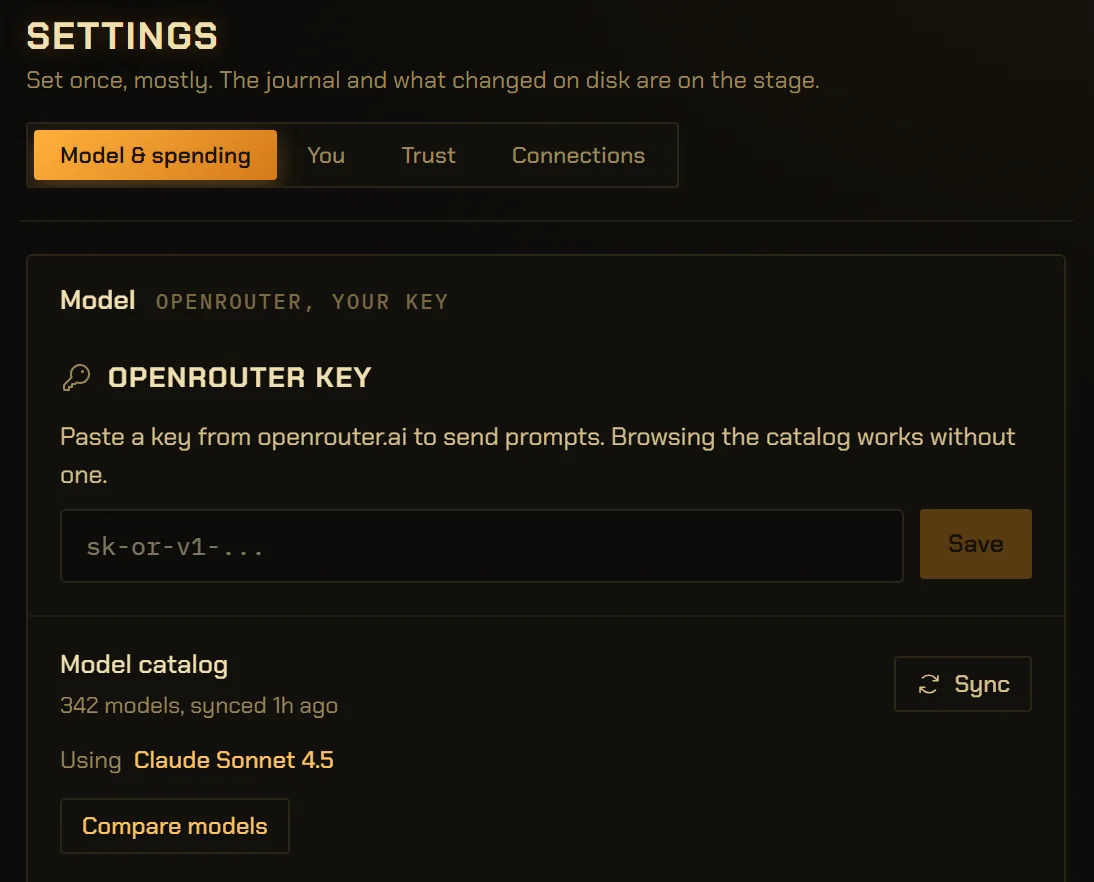
It opens on the key, and works without one.
With no key, the app starts here. Until you paste one, the composer says “Add an OpenRouter key to send a prompt.”
Keyword search over your files and the model catalog already work, so you can look before you spend anything.
Four steps,
nothing spent until the last.
Add a folder.
It becomes a project, and the index walks it. A later sync over untouched files is one check per file, not a re-read.
Search it with no key.
Keyword search answers at once. Search by meaning needs a model, and until then the app says why that half is missing.
Paste your key.
It goes to Windows Credential Manager and is never shown back. Check tells you whether OpenRouter accepted it.
Type, and send.
There is no mode to pick. Your trust level sets what asks first, and the know-how loads with the work. One chat, and its playbooks.
- a public installer
- code signing
- auto-update
- a waiting list
- a Mac date
No build has been signed or published. When a signed Windows installer has a host, its link goes in the box above, and nothing is collected from you before then.
Where it runs, and where things live.
- Platform
- Windows. The only platform it is built and verified on.
PROGRESS.md - macOS and Linux
- Coming soon. No date.
- Needs a key for
- Sending prompts and search by meaning. Keyword search and the catalog work without one.
vb-index/src/lib.rs - Your key
- Windows Credential Manager, entry “VectorBrain Desktop”. Never returned to the window, never journalled.
vb-llm/src/key.rs - Your files
- Stay in your folders. The agent reads and writes only inside the ones you add.
vb-cmd-fs/src/paths.rs - App data
- %APPDATA%\one.vectorbrain.desktop
vb-app/tauri.conf.json - Backups
- Before any upgrade the database is copied first; the newest five copies are kept. “Back up my data” is on Settings.
vb-db/src/lib.rs - Current build
- Version 0.7.0, 2026-09-29. Not released.
Cargo.toml
The details,
for the careful.
Can I download VectorBrain today?
Not yet. There is no public installer, no code signing and no download host. The link will appear on this page when a signed Windows installer exists.
Does VectorBrain run on a Mac or on Linux?
Not yet. macOS and Linux are coming soon, with no date attached. Windows is where the app is built and verified, and several features, including PDF export and driving the browser pane, refuse to run anywhere else today.
What do I need to run VectorBrain?
A Windows computer, a folder to work in, and an OpenRouter API key for anything that calls a model.
Does VectorBrain work without an API key?
Partly. Keyword search over your project files and browsing the model catalog work with no key. Sending a prompt and search by meaning need one.
Do I need a VectorBrain account?
No. There is no VectorBrain account and no server to sign in to. The only account involved is your own OpenRouter account, for the key.
Is there a waiting list?
No. The product has no accounts, and a mailing list would be one. Check this page or the changelog instead. Changelog
Where does VectorBrain keep my data?
Your files stay in the folders you add. The app’s database is in %APPDATA%\one.vectorbrain.desktop, and your key is in Windows Credential Manager. Nothing is sent to VectorBrain. Privacy