
The workspace
$25once
VectorBrain
Chat, documents, design and code.
- Claude, GPT, Gemini, any model
- Agents and crews you set up
- Plugs into Claude Code and Codex
 VectorBrainDownload
 Use any AI model you want. Claude, GPT, Gemini, whatever’s best for the job.Works great on its own, and plugs right into Claude Code or Codex.
Honestly, it isn’t one app, and it isn’t one AI company. Claude, GPT, Gemini and the rest are all powerful, and each is better at some things than others. That’s the beauty of it: try them, and find the ones that are best for you.
It drafts, designs and builds as fast as you like. The ideas, the taste and the final say stay with you, and so does everything you make.
No subscription, and every future update is included. The only other bill is the AI you use, on your own OpenRouter key.
$25once
Chat, documents, design and code.

$25once
Graphic design tool.
$45$50once
Your agents can design, and your designs can think.

FreeAnd VectorBrain Viewer is free. One folder for everything your AI makes, as thumbnails.
Every future update included. Checkout isn’t open yet; the buttons show where the download stands.
Writing, design and code are one conversation.
There is nothing to pick before you type. When the work needs design know-how, the code loop or the spreadsheet format, a playbook loads and stays for the rest of the conversation: you name it with a slash, or the app loads it from what you attach and ask. Every conversation already holds the project’s brief, with its notes on the index.
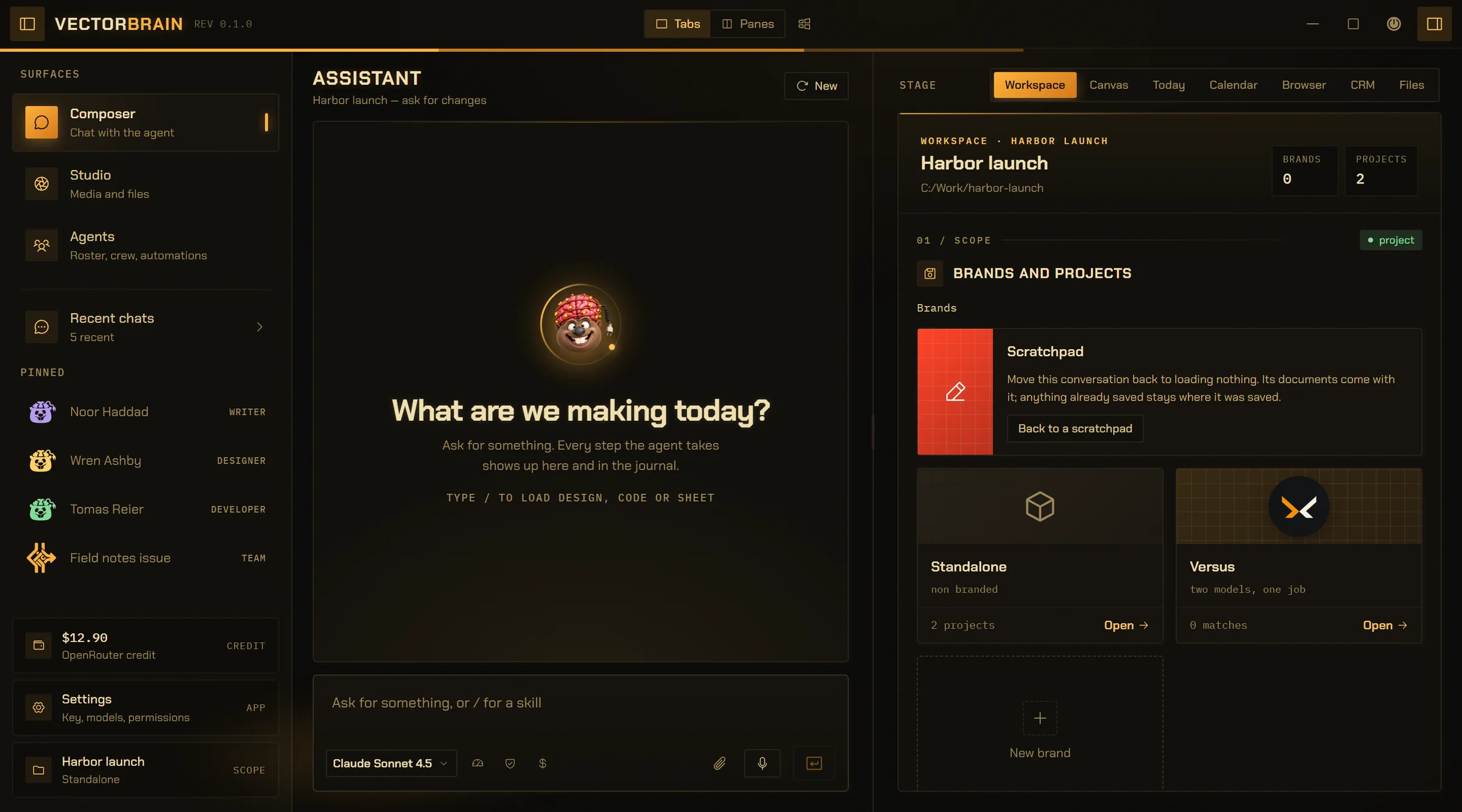
Research, write, and work with real files. Turn a conversation into a document, with every version kept along the way.
Pictures and pages on a live Canvas, in your project’s look. As many directions as you ask for, then the one you pick, built out.
Search before reading, read before editing, then run the build. Running a program still asks you first, unless you turn the trust dial all the way up.
A model on its own can only talk. A harness is everything around it that lets it do real work: your files, tools, memory, a browser, and the rules about what it’s allowed to touch.
VectorBrain is that harness, and it fits any engine. Swap Claude for GPT or Gemini, and everything else stays put.
Claude, GPT, Gemini, whatever comes out next. Pick one per conversation, on your own OpenRouter key.
Already in Claude Code or Codex? Connect them, and they get your Studio, your agents and your project search.
Chat, documents, design, code, a Studio for images, video and sound, a CRM with invoices, and a browser. One app, $25 once. You only pay for the AI you actually use.
One conversation at a time is a perfectly respectable way to work. Or fold both drawers, tile six, and run six conversations on six jobs across six models at once. The window keeps up. Your OpenRouter balance is your own business.
Meet the ones doing the work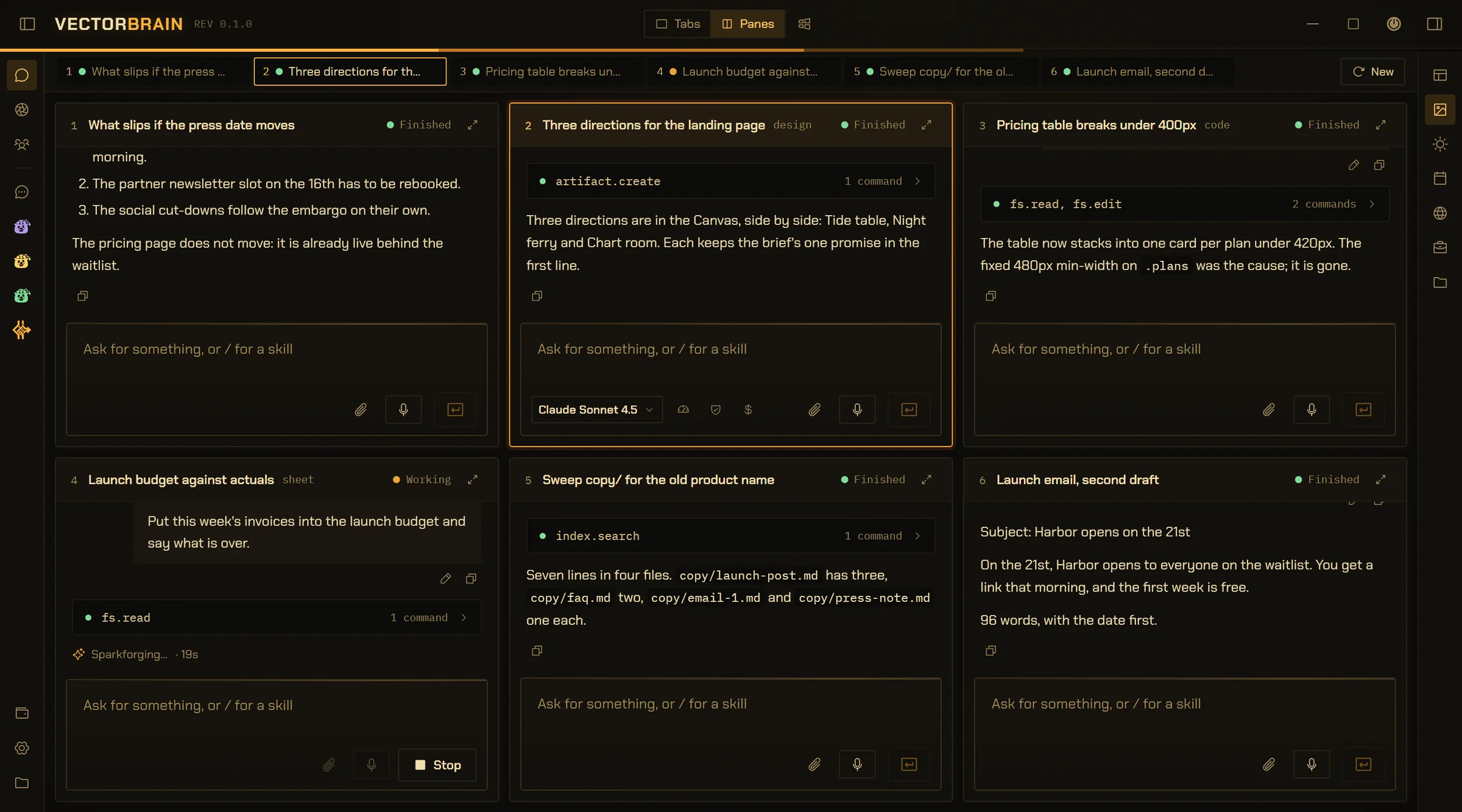
google/gemini-2.5-proDeep
anthropic/claude-sonnet-4.5Balanced
openai/gpt-5Careful
moonshotai/kimi-k2-0905No thinking
google/gemini-2.5-flashQuick
z-ai/glm-4.6Balanced
Any model your OpenRouter key reaches, picked per conversation.
Not to the app. Put the architecture on the deepest model you have and the file sweep on the fastest one. Changing either never moves the other.
Panes counts what actually fits — four across on a wide monitor, fewer once the stage takes its room back. Nothing reshuffles on its own.
Working, finished, or stopped to ask you something: every pane says so in its header. Answer that one without losing the other five.
Your key, any model, and what happens when one dies mid-answer
Six roles — director, researcher, writer, developer, designer, media. Each agent is somebody you made: its own model, its own narrowed set of tools, its own folder of notes to search. Nothing shipped pre-staffed.
A crew is not an org chart. It is a permission, in your signature, for one job: who the lead may hand work to, and what each of them was asked for. Anyone not named in it is refused by name.
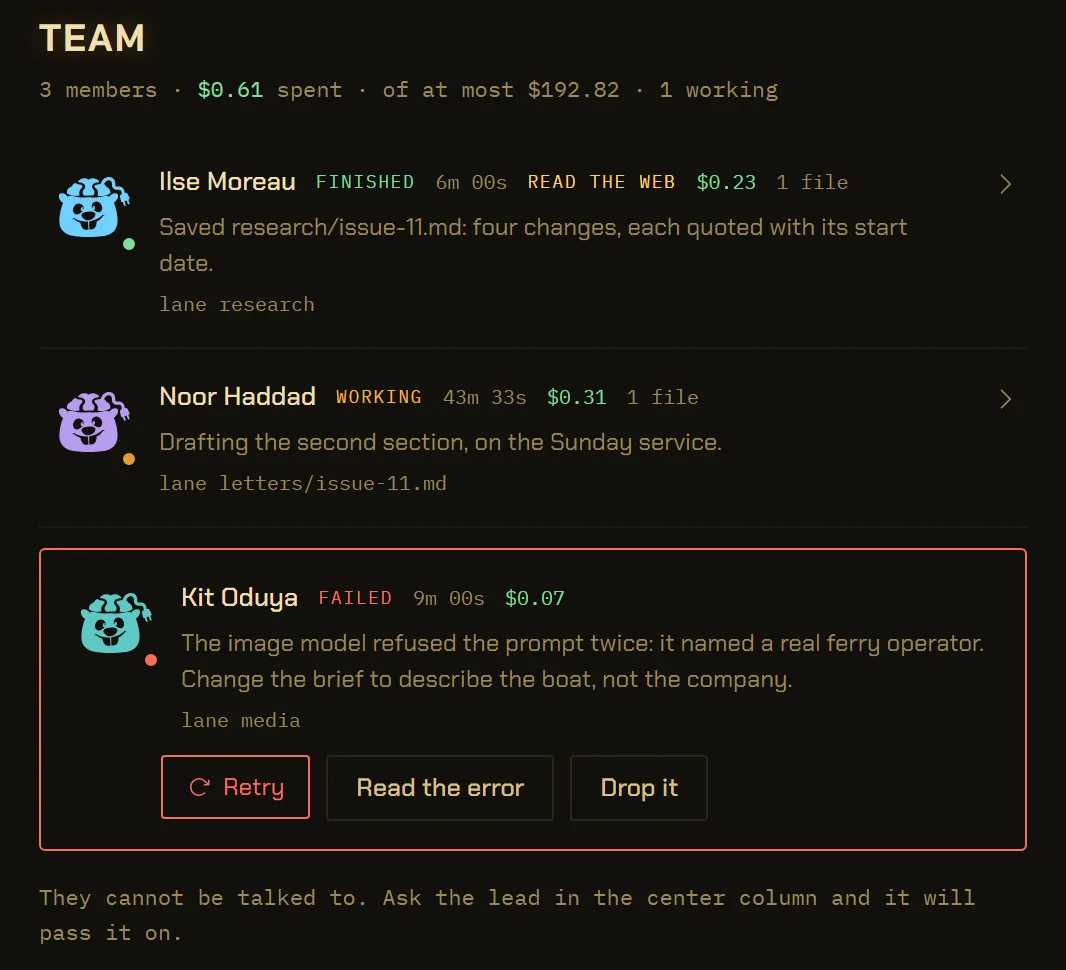
A crew is drafted, then signed — and nobody can be delegated to while it is still a draft. Once you sign, the lead starts handing work out on its first turn instead of asking you to approve the same four names for every client.
An agent’s folder can arrive in somebody else’s clone, so nothing in it gets to put itself one click from you. The command that writes the pins is refused to the agent by name, and a pin naming nobody is refused when you make it.
A crew you keep is Markdown in your own folder, one file per crew. Rename an agent and it comes back under the new name; delete one and the row says so rather than quietly vanishing from a list you built.
Most agents “browse” somewhere you cannot see and hand you back a wall of text you are invited to trust. VectorOxide is the other thing: a real browser pane — a native WebView2 surface the app places over the stage, measured and positioned by the pixel — holding one session you and the agent are both looking at.
It is the app’s own wordmark with one word changed, because it is the same window, not a bolted-on tab.
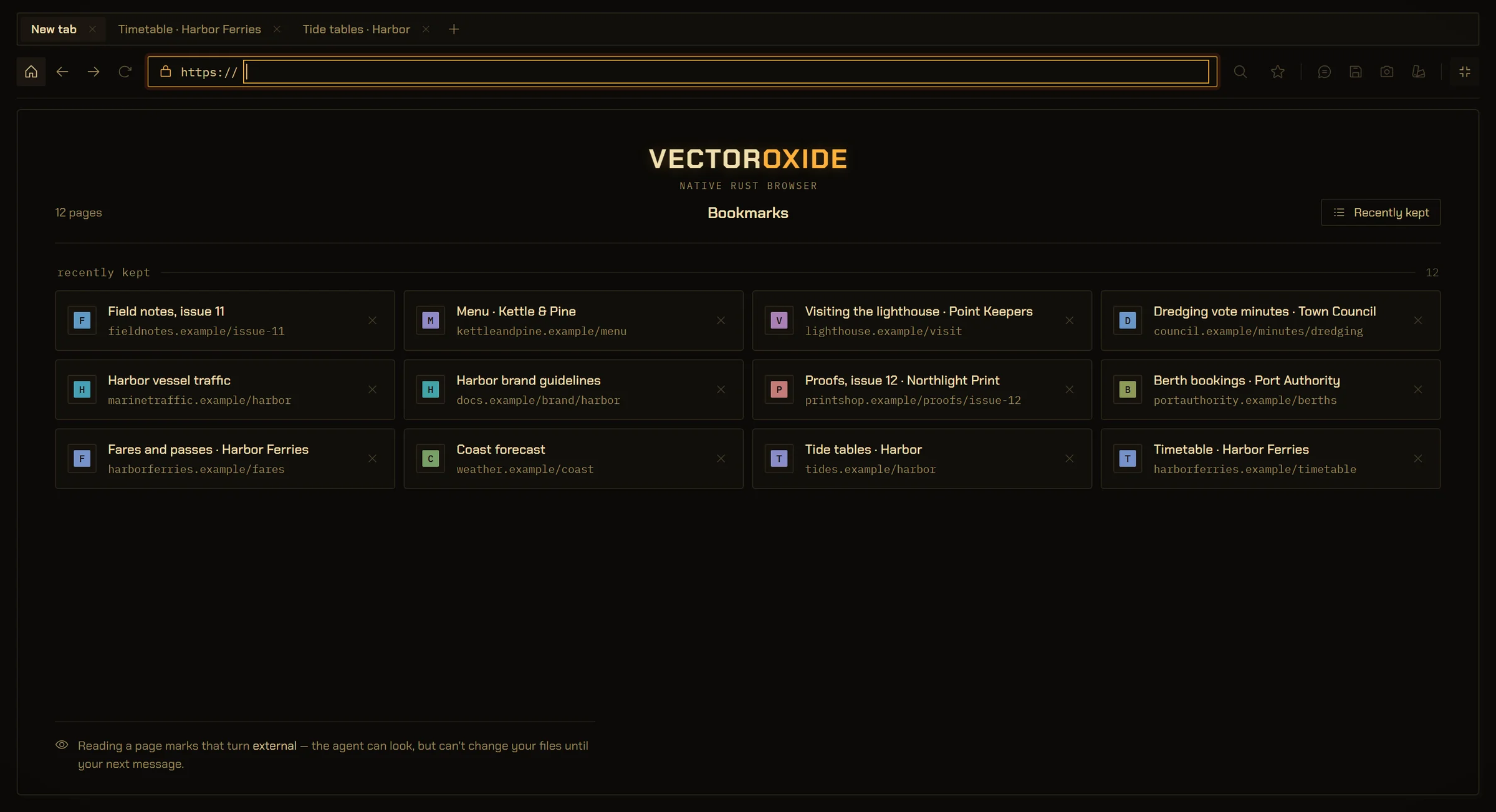
There is no search engine in here. https and the public web, and every move the page makes for itself — a link, a redirect, a script — is checked again before it loads. A site with no https fails to load rather than loading in the clear.
A fill aimed at a password field is refused at the door. An approval replays its stored input word for word, so a password inside an agent’s action would sit in your local database in plain text for as long as you took to decide. You type your own passwords. That is the design, not a gap.
A button can buy something, send something, or close somebody’s account, and nothing about having read the page answers that. So acting outward always waits, whatever your permission settings say — and only a person can lift it, for one session or as a standing grant the agent is refused the right to write.
Read a page and that run is marked external. It can keep looking, keep thinking, keep summarising — and it cannot touch your files again until your next message. Read, then click: fine. Read, then quietly overwrite: not possible.
Up to twelve tabs, each a real webview on one shared profile, and every command means the tab in front — so what the agent reads is the page you are looking at. What is deliberately missing: no history surface, no downloads, no developer tools. Even the letters on those bookmark tiles are generated rather than fetched, so opening your own start screen tells nine sites nothing.
VectorOxide at length: what the agent reads, and what it may not do
VectorBrain does the thinking. VectorBrain.Design makes it look good. Viewer keeps track of what your AI made.
Each one works without the others. The two paid apps are $25 each, once, with every future update included. Viewer is free.
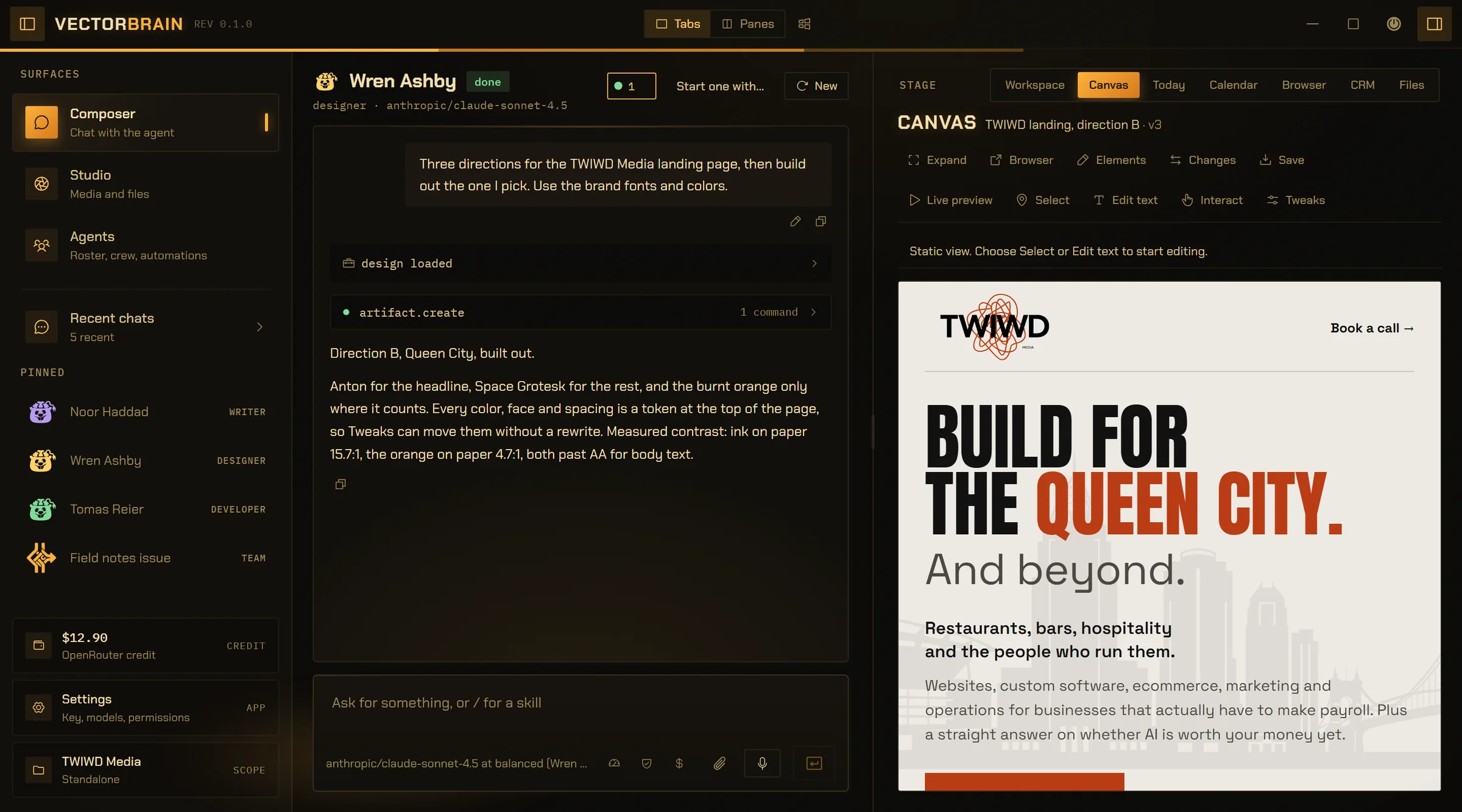
Your AI workspace. Chat, documents, design and code, on any model you like.
Windows. Download coming soon.
Screenshot of VectorBrain.Design
A real capture of the 3D mockup studio goes here.
A design studio for logos, shirts, posters and social graphics.
Windows. Coming soon.
Screenshot of VectorBrain Viewer
A real capture of the thumbnail grid goes here.
One folder for everything your AI makes, as thumbnails you can actually see.
Windows. Free download coming soon.
VectorBrain + VectorBrain.Design
$45 instead of $50, paid once. Every future update included.
An AI that doesn’t just answer, it does the work. Ask for a report and it researches, writes and saves the file. Here, an agent is someone you set up once: a name, a job, the model it runs on, and what it’s allowed to touch.
Everything around an AI model that lets it do real work: the files it can read, the tools it can use, what it remembers, and the rules about what it’s allowed to touch. The model is the engine; the harness is the rest of the car. VectorBrain is a harness that works with any model.
The kind you’d set up: a researcher that checks a claim against the source, a writer that drafts the launch email, a designer that mocks up three directions for a landing page, a developer that fixes the bug. Put them in a crew and the lead hands out the work. Agents and crews, up close.
Yes, and no code. Name it, pick a role, write the job in your own words, choose a model and what it can use. It’s saved as a plain file on your computer. How building an agent works.
Yes. Run any agent on Claude, GPT, Gemini or anything else on OpenRouter, with your own key, and switch per conversation. Already in Claude Code or Codex? Connect them, and they can hand work to your agents. How the Claude Code and Codex hookup works.
That’s the point. They ask before anything that matters, every step is logged, and documents keep every version. A crew only runs once you’ve signed off on who does what and the most it can cost. How approvals work.
Sort of, but one that lives on your computer and works on your actual files. It drafts, designs, codes and researches, and you still make the calls.
Your project files, knowledge library and history are stored locally. When you use a model, the prompt and the context it needs go to the provider you picked, through OpenRouter. There is no VectorBrain cloud holding your work. The long version is on Trust.
No. VectorBrain already designs pages and pictures on its Canvas. VectorBrain.Design is a full design studio for logos, shirts, posters and social graphics, with vector editing and 3D mockups. Each works on its own, and the two together are $45. What each one costs.
A Windows computer, a project folder, and your own OpenRouter key for the AI features. Keyword search works without a key. The public download is still being prepared. What first run looks like.
Yes. Windows is the current platform. macOS and Linux are coming soon; release dates have not been announced.
Your next idea deserves a VectorBrain.
macOS & Linux coming soon